Track driving licence status quickly to avoid unnecessary delays and confusion. Whether you’re applying for a full or provisional driving licence, keeping tabs on the progress helps you stay informed.
The DVLA offers an easy-to-use online tool to monitor your application no need to make endless calls or send follow-up emails. This guide explains how to check your driving licence online, track various types of applications, and understand your status updates, so you’re never left guessing.
Why You Should Track Your Driving Licence Application
Tracking your driving licence application is more than a convenience it gives you peace of mind. The DVLA handles millions of applications each year, and although most are processed quickly, occasional delays do happen.
Here’s why staying informed is essential:
- Avoid processing delays: Spot issues early like missing documents or failed identity checks.
- Plan better: Knowing your status helps you schedule driving tests, job interviews, or car insurance setup.
- Verify receipt: Confirmation that DVLA received your documents prevents repeat submissions.
- Save time: No need to phone DVLA or write letters when you can check progress online in seconds.
The online tracker is especially helpful if you’ve applied for a provisional licence online or renewed a photocard licence. We’ll walk you through each type of application in the next section.
How to Track Your Driving Licence Online
Using the official GOV.UK service, you can track driving licence progress easily from your computer or smartphone. The process is straightforward, but it depends on the type of licence application you’ve made.
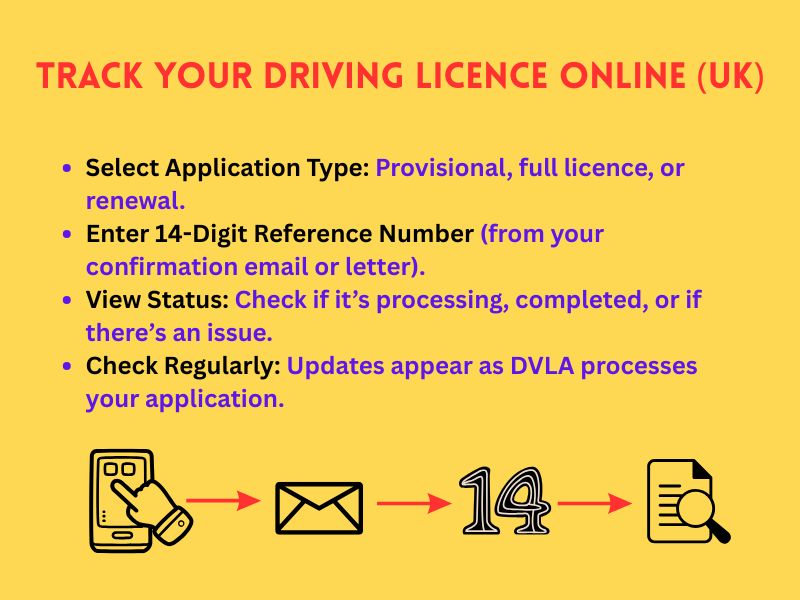
Follow these steps:
- Visit the official DVLA tracking page:
Go to gov.uk/track-your-driving-licence-application - Choose your application type:
- Provisional driving licence application
- Photocard renewal (10-year)
- First full licence after passing your driving test
- Enter your reference number:
This 14-digit number appears on your confirmation email or letter from the DVLA. If you applied for a provisional licence online, it may start with ‘FP’. - View your application status:
The tool will show whether your application is being processed, if it’s completed, or if there are issues. - Check regularly:
Updates aren’t instant, but statuses change once DVLA processes key steps.
You can track both provisional driving licence applications and full licence renewals the same way, using the appropriate reference number. Don’t worry if you’ve misplaced it we’ll explain your options in a later section.
What Your Driving Licence Application Status Means
Once you track driving licence progress online, the status messages might seem vague at first. Understanding what each one means can help you decide whether to wait patiently or take action.
Here are the common statuses and what they indicate:
| Status | Meaning |
| Application received | DVLA has your form and is starting checks. No issues reported so far. |
| Processing | Your ID, photo, or medical info is being verified. Sit tight unless told otherwise. |
| Awaiting further information | Something is missing—DVLA will send you a letter or email soon. |
| Licence issued | Your new or provisional driving licence has been approved and posted. |
| Application rejected | An error or eligibility issue occurred. DVLA will explain the reason. |
Each application type, whether a provisional licence application or a full renewal, goes through similar stages. The system updates periodically check back every few days if you’re waiting.
How to Track a Provisional Driving Licence Application
If you’ve submitted a provisional driving licence application, tracking it is simple with the DVLA’s online system. This applies whether you applied online or by post.
Here’s what you need to know:
For Online Applications:
- You’ll receive a confirmation email with a 14-digit reference number.
- Go to the DVLA tracking page.
- Enter your reference number to check driver license status instantly.
- You’ll see your current stage: received, in progress, or issued.
For Postal Applications:
- You won’t get a reference number by default.
- Wait at least three weeks before contacting DVLA.
- If nothing arrives, you can call DVLA with your personal details to check manually.
Look for ‘FP’ Reference Numbers:
- These often appear on provisional licence applications and help DVLA identify the request faster.
Even if you’ve opted for a provisional licence online, it’s a good idea to keep a screenshot of your confirmation message. That way, you can quickly track your application without delays.
Tracking a 10-Year Photocard Licence Renewal with a ‘TY’ Reference
Renewing your licence after 10 years? You’ll likely receive a ‘TY’ reference number. This makes it easy to track driving licence renewals through the official DVLA tool.
Here’s how to track your 10-year photocard renewal:
Applied Online?
- After submitting your driving licence application, you’ll get a TY reference number by email.
- Go to the renewal tracking page.
- Enter your TY number to see updates like:
- Application received
- ID or photo check
- Licence issued
Applied by Post?
- You won’t get a TY number automatically.
- Wait around 3 weeks before checking your mailbox.
- Still no licence? Contact DVLA directly to confirm receipt and status.
Renewing on time and tracking your application ensures you’re never driving with an expired licence, which could lead to fines or penalties.
How to Share Your Driving Licence Check Code with Others
Once you’ve generated your driving licence check code, it’s easy to share it with others who need to verify your driving status. However, it’s important to do this securely to avoid misuse of your personal details.
Methods for Sharing Your Check Code:
- Via Email:
Copy the code from the GOV.UK page and send it via email to the requestor. It’s essential to include the exact expiration date of the code so they know when it will no longer be valid. - Printed Copy:
You can also print the code and give it to the person or organization that needs it, ensuring the code is clear and legible. - Online Forms:
If you’re completing an online form for a rental agency or an employer, simply paste the code into the designated field.
Security Tips:
- Don’t share it unnecessarily: Only provide the check code when it’s absolutely necessary.
- Monitor your driving status: Keep an eye on your driving record in case of any unexpected changes after sharing the code.
Sharing your code securely ensures that only authorized individuals have access to your driving records.
What to Do If You’re Unable to Track Your Driving Licence Online?
If you’re facing issues tracking your driving licence online, don’t worry. There are alternative ways to find out the status of your driving licence application or provisional licence.
Troubleshooting Online Issues:
- Check your details: Ensure the reference number you entered is correct. Small typos or missing digits can cause errors.
- Browser issues: Try using a different web browser or clearing your cache and cookies.
- Wait for a few days: Sometimes, the DVLA system takes time to update, so check again after 48-72 hours.
Contact DVLA for Assistance:
If online tracking still doesn’t work, you can contact the DVLA:
- DVLA Helpline: Call 0300 790 6801 for updates.
- Operating hours: Monday to Friday, 8 AM to 8 PM; Saturday, 8 AM to 4 PM.
- Mail inquiries: Write to the DVLA for assistance with your application or account status.
Submit a Request via Post or Email:
If phone support doesn’t resolve your issue, you can also submit your request by post or email. However, be prepared to provide:
- Your full name and address.
- Your driving licence number or application reference number.
- Details about the issue you’re encountering.
Benefits of Tracking Your Licence Application
- Stay informed: Easily track the progress of your application online to avoid surprises.
- Resolve issues quickly: If there are any problems with your application, tracking allows you to address them promptly.
- Plan ahead: Knowing when to expect your driving licence allows you to make plans around its arrival, whether it’s for a driving test, a road trip, or a rental car.
By using the DVLA’s tracking system, you can gain peace of mind and avoid unnecessary stress during the application process. Whether applying for a provisional driving licence or checking your driving record, always ensure your details are correct and up-to-date.
If you encounter any difficulties tracking your application, don’t hesitate to contact DVLA for assistance through their helpline, email, or postal service. The convenience of online tracking makes managing your driving licence applications easier and faster than ever before.
FAQs
Visit the DVLA website, enter your reference number, and check the application status.
A unique 16-character code that allows others to verify your driving record online.
The check code is valid for 21 days.
Yes, you can track the status using the 14-digit reference number on the DVLA website.
Wait for confirmation from DVLA or contact them by phone, email, or post for updates.
Check the status on the DVLA website or call the helpline if there are delays.
Related Posts
Previous Post
Next Post





- Business
 5
5 - Cricket5
- Department for Education49
- Departments3
- Driving and Transport
 53
53 - Education45
- Finance6
- Football13
- Golf3
- Government
 108
108 - Guides1
- Health
 5
5 - Health4
- International Politics9
- Law and Justice31
- Money and Tax23
- National Politics4
- News68
- Politics6
- Sports38
- Technology5
- Tennis3
- Transportation4
- Uncategorized4
- Visa
 17
17 - Visas and Immigration
 24
24 - Weather1