Managing your taxes and interacting with HM Revenue and Customs (HMRC) has become simpler with online services. This blog explains how to do HMRC login, resolve common issues, and use key features like HMRC self-assessment, HMRC tax refunds, and more.
Why Logging In to HMRC Matters
The HMRC online portal is your gateway to managing taxes, updating personal details, and accessing critical services. Whether you need to file a HMRC tax return, check your HMRC personal tax account, or contact HMRC via their phone number, logging in is the first step. Over 90% of UK taxpayers now use digital services for faster resolutions.
Step-by-Step Guide to HMRC Login
Accessing the HMRC Website
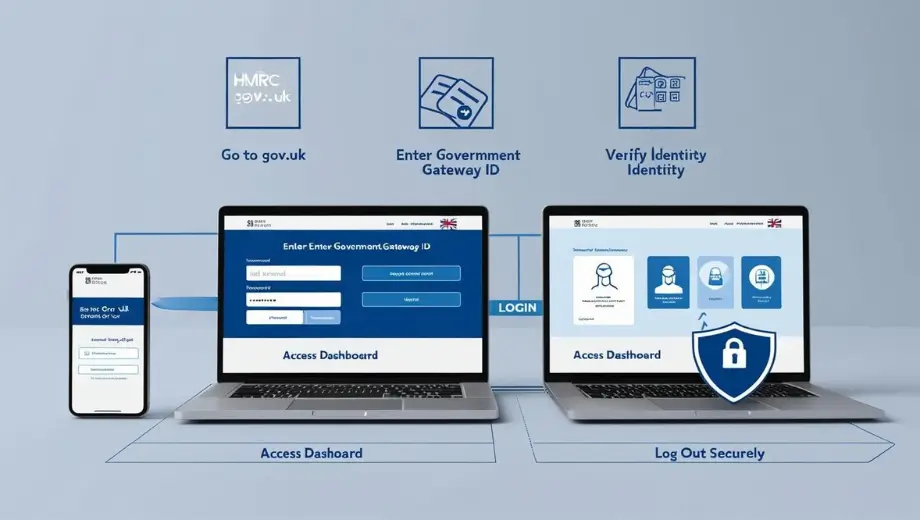
Start by visiting the official GOV.UK page for HMRC services. Ensure you’re on the correct site to avoid phishing scams. Look for the “Sign in” button at the top right corner.
Choosing Your Account Type
HMRC offers three account types:
- Individual accounts: For personal tax management, including HMRC self-assessment login and checking your HMRC tax refund status.
- Organization accounts: For businesses managing VAT, PAYE, or Corporation Tax.
- Agent accounts: For tax advisors assisting clients.
If you’re new, select “Create an account” and follow the prompts. You’ll need your National Insurance number and a valid email address.
Government Gateway Login
Most services require a Government Gateway ID. If you don’t have one:
- Click “Create sign-in details” on the HMRC login page.
- Provide personal information (e.g., name, date of birth).
- Verify your identity using a UK passport, driving license, or credit file.
- Set up two-factor authentication for security.
Existing users can enter their Government Gateway ID and password directly.
Using the HMRC Personal Tax Account
Once logged in, your HMRC personal tax account dashboard shows:
- Income Tax estimates and tax codes.
- State Pension Forecasts.
- Options to claim HMRC tax refunds or update marital status.
For self-employed individuals, the HMRC self-assessment login portal allows you to submit tax returns, view payment deadlines, and check owed amounts.
Understanding tax thresholds is crucial for effective planning. Similarly, knowing how UK Income Tax works can help manage your overall financial strategy.
Troubleshooting Common Login Issues
Forgotten Government Gateway ID or Password
Click “Forgot user ID or password” on the login page. HMRC will send recovery instructions to your registered email or mobile number. If issues persist, call the HMRC contact number for support.
Two-Step Verification Problems
Ensure your registered phone or email is accessible. If codes aren’t arriving:
- Check spam folders.
- Request a new code after 15 minutes.
- Update contact details via your HMRC personal tax account.
Browser Compatibility
HMRC’s portal works best with updated browsers like Chrome, Firefox, or Edge. Clear cookies or try incognito mode if pages load incorrectly.
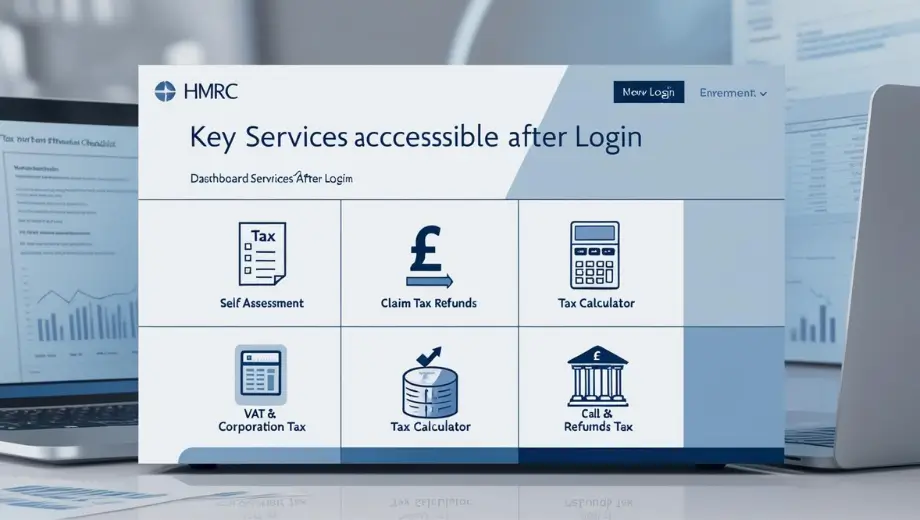
Key Services Accessible After Login
Managing Self Assessment
The HMRC self-assessment portal is vital for freelancers, landlords, and company directors. Use it to:
- File annual tax returns (HMRC tax return).
- Check payment deadlines (31 January for online submissions).
- View previous tax calculations.
Claiming Tax Refunds
If you’ve overpaid taxes, your HMRC personal tax account shows eligible refunds. Follow the prompts to submit bank details securely. Refunds are typically processed within 5 working days.
Using the HMRC Tax Calculator
The HMRC tax calculator estimates Income Tax, National Insurance, and pension contributions. Access it via your account to plan finances or adjust tax codes.
VAT and Corporation Tax Services
Business accounts allow VAT registration, Corporation Tax submissions, and PAYE management. Small businesses can also check VAT thresholds.
Contacting HMRC: Phone Numbers and Support
HMRC Contact Numbers
- Self Assessment Helpline: 0300 200 3310 (Monday–Friday, 8 AM–6 PM).
- VAT Helpline: 0300 200 3701 (Same hours).
- Free phone number for HMRC: 0800 328 5644 (Textphone for hearing impairments).
Avoid scams by only using numbers listed on GOV.UK. HMRC never asks for bank details via email or SMS.
Webchat and Postal Support
For non-urgent queries, use the HMRC online webchat or send a letter to:
HM Revenue and Customs
BX9 1AS
United Kingdom.
Security Tips for HMRC Accounts
- Strong Passwords: Use a mix of letters, numbers, and symbols. Avoid obvious phrases like “password123”.
- Two-Factor Authentication: Always enable this feature to block unauthorized access.
- Phishing Scams: Report suspicious emails claiming to be from HMRC to phishing@hmrc.gov.uk.
Additional Resources
HMRC Jobs and Recruitment
Explore careers at HMRC via the Civil Service Jobs portal. Roles range from customer service to tax investigation. Use keywords like “HMRC jobs” or “HMRC recruitment” to filter opportunities.
HMRC Opening Hours
Most phone lines operate Monday–Friday, 8 AM–6 PM. Check specific service pages on GOV.UK for exceptions like holiday closures.
Mobile App Access
Download the HMRC app (iOS/Android) to manage taxes on the go. Features include checking tax codes, submitting Self Assessments, and tracking refunds.
Logging into HMRC online services streamlines tax management reduces errors, and speeds up refunds. By following this guide, you can securely access your HMRC personal tax account, resolve issues via the HMRC contact number, and stay compliant with deadlines. Bookmark the official GOV.UK page for updates and never share your login details to protect against fraud.
For visual learners, HMRC’s YouTube channel offers tutorials on using your account. Stay informed, and simplify your tax journey today.
FAQs
1. How do I recover my Government Gateway User ID if I’ve lost it?
You can recover your Government Gateway User ID by checking your email for a message from HMRC or by using the “Problems signing in” page on the HMRC website to request it be sent to your registered email.
2.What should I do if I forget my Government Gateway password?
If you forget your password, you can reset it by visiting the HMRC login page and following the prompts to receive a password reset link via email.
3. What is the HMRC contact number for login issues?
For assistance with login issues, you can call the HMRC helpline at 0300 200 3600, available Monday to Friday from 8 AM to 6 PM.
4. Can I access my HMRC account from my mobile device?
Yes, you can access your HMRC account from mobile devices using the HMRC app or through a mobile browser by visiting the official HMRC website.
5. What services can I access once I log in to my HMRC account?
After logging in, you can access various services, including your personal tax account, self-assessment submissions, VAT registration, and checking your tax refund status.
Source / Ref.: Gov.uk Contains public sector information licensed under Open Government Licence v3.0.
Written by [Ketan Borada / British Portal Team] – Founder of British Portal, dedicated to providing accurate and up-to-date information on UK public services and benefits.Related Posts
Previous Post
Next Post






- Business
 5
5 - Cricket5
- Department for Education49
- Departments3
- Driving and Transport
 53
53 - Education45
- Finance6
- Football13
- Golf3
- Government
 108
108 - Guides1
- Health4
- Health
 5
5 - International Politics9
- Law and Justice31
- Money and Tax23
- National Politics4
- News68
- Politics6
- Sports38
- Technology5
- Tennis3
- Transportation4
- Uncategorized4
- Visa
 17
17 - Visas and Immigration
 24
24 - Weather1